
Just-right temperatures.
Set separate pool and spa temperatures, choose Fahrenheit or Celsius, and see when the heater is working. Where your system links heating to Spa Mode, Poolside keeps that simple too.
For Pentair EasyTouch and IntelliTouch systems with ScreenLogic
Warm up the spa. Turn on the lights. Make the water just right. Enjoy simple pool and spa controls at home, away, or right from your wrist.
Available now for iPhone, iPad & Apple Watch · Free
Everything you need for a relaxing pool day, in one clear view. App screens shown with sample readings.


Set separate pool and spa temperatures, choose Fahrenheit or Celsius, and see when the heater is working. Where your system links heating to Spa Mode, Poolside keeps that simple too.
Switch pool circulation, Spa Mode, jets and lights with a tap. Add other installed equipment to your controls and give it names that make sense to you.
Create and adjust recurring pump and light schedules. Your pool system keeps them running, even when your phone is away.
Let Poolside keep your pool system’s clock up to date when you open the app and connect. You can also set the date and time yourself.
Automatic connection tries your home network first, then remote access when needed. Choose local-only or remote-only access if you prefer.
See water temperatures and equipment status in a clean blue interface. Clear connection indicators let you know when readings are current or your system is reconnecting.
Choose a reminder for Spa heat, Spa Mode or Spa jets after 15, 30, 45, 60 or 90 minutes, 2 hours or 3 hours. Alerts are off until you choose to enable them.
Reminders use activity shared by participating devices and your known schedules. Changes made elsewhere may not be reflected. Reminders do not turn equipment off. Learn about your privacy.
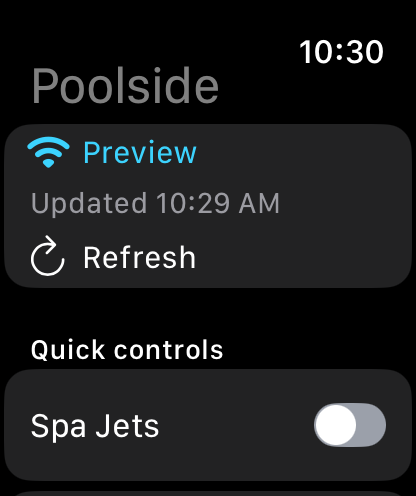
Switch the lights, start the jets, adjust temperatures and check your pool and spa without reaching for your phone. Your chosen extra equipment controls can come along too.
Set up independent watch access on your paired iPhone to use Wi-Fi or cellular without keeping the iPhone app open.
For Pentair EasyTouch and IntelliTouch systems with ScreenLogic. You’ll need a working ScreenLogic adapter and an iPhone or iPad with iOS/iPadOS 17 or later. Apple Watch requires watchOS 10 or later.
Available controls depend on your installed equipment. Poolside does not connect directly to IntelliCenter or standalone Wi-Fi pumps. Home access requires connection to your pool’s network; control away from home requires ScreenLogic remote access and an internet connection.
Poolside Control is now available on the App Store for iPhone, iPad and Apple Watch. Explore the setup guide or contact us for help.